
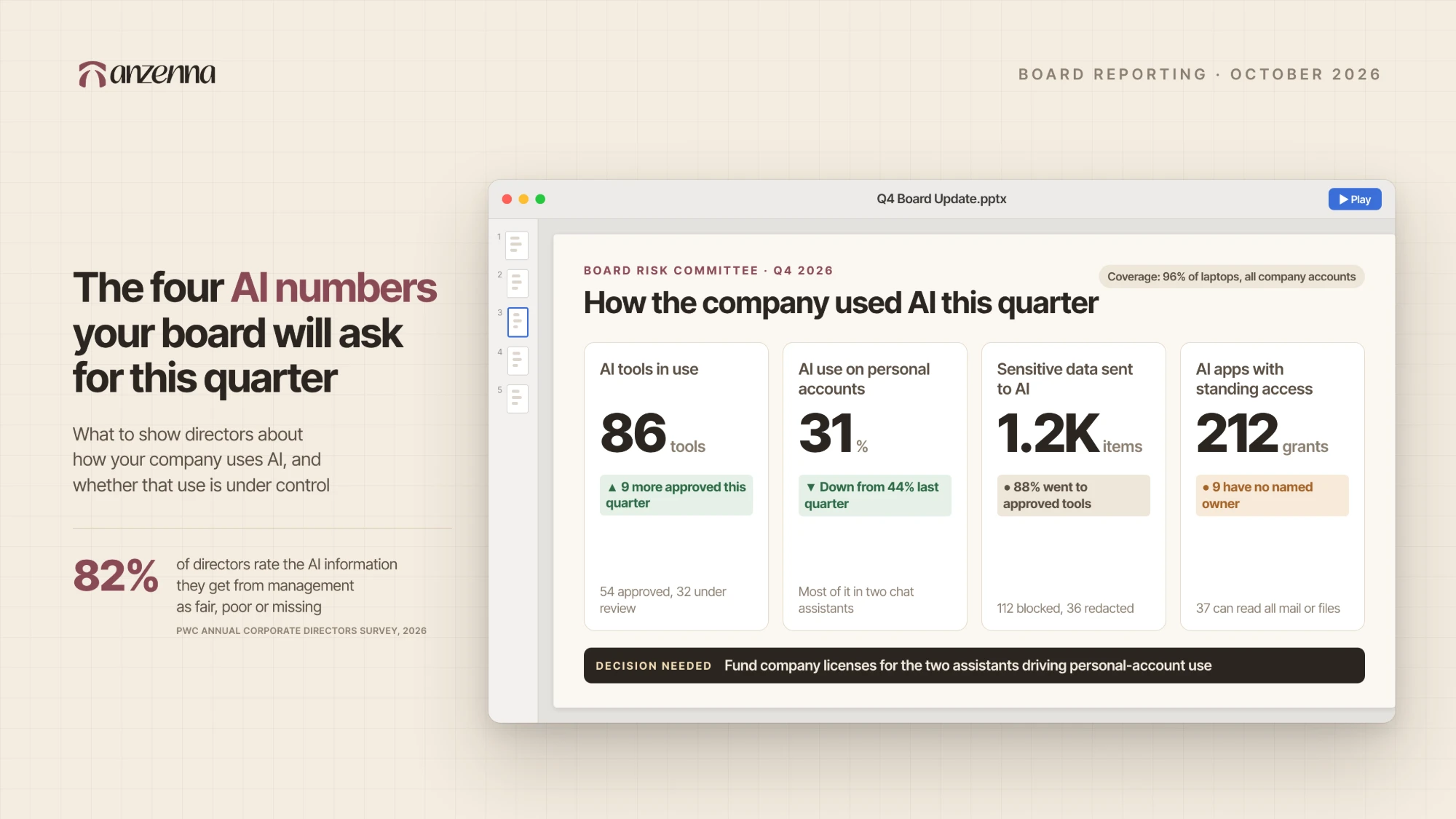
At some point in a fourth-quarter board meeting, a director turns to the CISO and asks a version of the same question: how is the company using AI, and should we be worried about it? Directors are also reading the headlines. The FTC opened an investigation into OpenAI, Anthropic and other AI companies over the safety risks of their products, The Washington Post reported on September 30.
Directors say the answers they get today fall short. In PwC’s 2026 Annual Corporate Directors Survey, published September 23, 58% of directors said their boards had increased their interactions with the CISO over the past year. The same survey found that 82% rate the information they receive linking AI outcomes, risks and business performance as fair, poor or not provided at all.
Most security teams can answer parts of the question. They know which AI tools are approved and have a policy in place, and some have DLP rules for a few chat sites. Turning that into a clear picture of how AI is used across the whole company is harder, for two reasons. AI has no agreed set of board metrics the way phishing or patching does, so each team guesses at what directors want to see. Even when a team knows which numbers matter, the data behind them is spread across identity and endpoint tools that were never built to record AI activity, and some of it isn’t collected anywhere yet.
We think four numbers settle the first problem, and this piece walks through where to find the data for each one. Every number answers a question directors already ask and can be tracked from one quarter to the next, and all four fit on a single slide.
What directors say they aren’t getting
The 2026 CISO-Board Engagement Report from IANS Research, Artico Search and The CAP Group asked directors to grade the reporting they get from their CISOs. Current risk posture and program operations scored reasonably well. “AI and emerging tech trends” did not, with 47% of directors saying that reporting needs improvement and 12% rating it excellent. One director at a public company told the researchers, “I’d like updates to focus more on what’s coming next.”
PwC’s directors made a similar point from the other side. Asked how management could improve board materials, they asked for sharper synthesis and more forward-looking analysis rather than more volume. A long security deck with AI buried halfway through is the format they are describing.
The two questions a security team can answer with data
The National Association of Corporate Directors publishes a discussion guide for board decisions on AI as part of its 2026 Director’s Handbook on Cyber-Risk Oversight. Most of its questions are about strategy and belong to the CEO, such as how competitors use AI or whether the board has the right expertise. Two of them land squarely on the security team.
The first asks what actions the company is taking to prevent shadow IT and unauthorized AI use, and how it is measuring success. The second asks how the company is managing AI “identity,” meaning whether AI agents can reach only the data sources they are authorized to reach. A director who has read the handbook will ask both, and both have numeric answers. The four numbers below are built to give them.
Number 1: How many AI tools your people use, and how many you approved
Start with a count of every distinct AI tool in use during the quarter. That includes chat assistants, coding tools, browser extensions, AI features inside SaaS apps your team already pays for, agents and MCP servers (the connectors that let an AI assistant reach other tools and data). Split the total into approved and not approved.
Where it comes from. No single source sees everything. Your identity provider shows the AI apps people sign into with company credentials. Google Workspace and Microsoft Entra list the third-party apps employees have authorized. Endpoint and MDM inventories show installed desktop apps and coding tools, and a browser extension inventory covers the assistants that live in the browser. Corporate card and expense data catches paid subscriptions that never touched single sign-on.
How to report it. Report the total number of AI tools in use and how many of them you’ve approved, as a count and as a percentage of the total. Then show how both figures moved since last quarter, and name the tools you approved during the quarter. A rising approved count is good news for the board, because it means employees asked for tools and the company said yes to them safely, and it gives directors evidence that the program enables the business as well as restricting it.
Number 2: How much of that use runs on personal accounts
The account matters as much as the tool. The same chat assistant used through a company account sits under your admin controls and your contract terms, including how long the data is kept. Used through an employee’s personal login, it sits under none of them, and anything pasted into it leaves the company’s view when it is sent.
Where it comes from. This is the hardest of the four to measure, so say that on the slide. Single sign-on logs only show company logins, and network logs show the domain someone visited without showing which account was signed in. Getting a real number takes visibility at the browser or inside the AI client, where you can see which identity is active.
How to report it. Show what percentage of AI activity ran on personal accounts during the quarter, the handful of tools where most of it happens, and how that percentage moved since last quarter. The direction you want is down, and the usual way to get there is to approve a company version of the tools people are already using on their own.
Number 3: What sensitive data went into AI tools, and what happened to it
Count the sensitive items that entered AI prompts and uploads during the quarter, such as customer records, source code, financial results or credentials. Then break that count down by outcome: allowed into an approved tool, warned, redacted or blocked.
Where it comes from. Traditional DLP watches email, file shares and endpoint channels well. Most of it can’t read a prompt typed into a browser tab, and it can’t tell a company account from a personal one on the same site. Producing this number means inspecting content at the point where it enters the AI tool.
How to report it. Sensitive data going into an approved tool under a company contract is often exactly what the business wants, so a large total is not automatically bad. The figure to drive down is sensitive data reaching unapproved tools or personal accounts. Presenting the outcome split lets directors see that difference without reading a single alert.
Number 4: Which AI apps and agents hold standing access to company systems
Every time an employee clicks “allow” to connect an AI tool to their work mail, drive, calendar or code repository, that tool keeps access until someone revokes it. AI agents and MCP servers add more of the same kind of standing access, usually through API keys or shared accounts with no named owner. This is the number that answers NACD’s question about AI identity.
The risk is concrete. In April, Vercel disclosed a breach that, according to Dark Reading, began when an employee signed up for a third-party AI office tool with a company Google Workspace account and granted it “Allow All” permissions. Attackers who had compromised the AI vendor used that employee’s OAuth token to reach Vercel’s environments. Vercel was not a customer of the AI vendor, and the grant was a single employee’s click.
Where it comes from. Google Workspace and Microsoft Entra admin consoles list the third-party apps each user has authorized and the scopes they hold. MCP server configurations live on developer machines, and secrets scanning finds API keys that agents use. Matching each grant to a person and a business reason is the slow part.
How to report it. Show how many AI apps and agents hold standing access, how many of those have broad scopes such as reading all mail or all files, and how many have a named owner. Add how many unused grants the team revoked during the quarter, since that shows the number is being managed as well as measured.
How to put the four on one slide
Give each number its own tile with four parts: the current figure, the change since last quarter, one line on what the team did about it, and a color only where something needs the board’s attention. Across the bottom, add one decision you need from the board, such as funding a company license for the tool most people are using on personal accounts.
Leave raw alert volumes and threat-actor news off the slide, along with any industry statistic that doesn’t connect to one of the four numbers. Directors told IANS they want to know where the risk is heading, so a single sentence that reads the trend for them will do more than any chart. For example: “Personal-account use fell this quarter as approved AI use grew, and every AI app that can read company mail now has a named owner.”
The first time you build the slide, some numbers will be incomplete. Show that directly by adding a line for coverage, meaning which parts of the company each number can actually see. A board can work with a partial number it understands, and it will notice when coverage grows from one quarter to the next.
How Anzenna produces all four
Anzenna connects to the tools you already run, such as your endpoint management, identity provider, email and file storage, with no new agent to deploy. A browser extension and hooks into major AI clients like Copilot, Claude, Cursor and Codex add the AI detail. From there Anzenna inventories every AI tool, agent and MCP server in use. Each prompt is recorded with the identity behind it, including whether it came from a company or personal account, along with any OAuth grants and files involved. Sensitive content is classified as it moves and can be warned on, redacted or blocked inline.
Every one of those records ties back to the person behind it, so the four numbers come out of one place with a name attached to each line. Most teams are live in days, which is soon enough to have real figures for the next board meeting.
To see how the numbers look in practice, drive the console yourself in our interactive tour, which runs on sample data. If you would rather see your own environment, book a walkthrough and we will show you your current figures for all four.
References
- PwC, “Board expertise gaps are rising as oversight demands grow: Insights from PwC’s 2026 Annual Corporate Directors Survey,” September 23, 2026.
- IANS Research, “Boards Give CISO Cybersecurity Reporting a Mixed Grade,” March 24, 2026 (from the 2026 CISO-Board Engagement Report by IANS Research, Artico Search and The CAP Group).
- National Association of Corporate Directors, “Discussion Guide for Board Decisions on AI,” 2026 Director’s Handbook on Cyber-Risk Oversight, April 2026.
- The Washington Post, “FTC launches broad investigation into Anthropic, OpenAI,” September 30, 2026.
- Dark Reading, “Vercel Employee’s AI Tool Access Led to Data Breach,” April 20, 2026.